Showing posts with label BBF. Show all posts

Friday, May 9, 2014

Project365 - Manipulating Light with Gels

Introduction
I really should stop calling this a 365 Project - we've been so busy moving and settling into the new house that I really haven't been able to make time to shoot. I will do my very best to get back to shooting regularly, if not every day !

Pat taught me how to make jam over the past few days. On the first evening, we made ten jars of strawberry jam. I thought it would make a colourful subject for this blog, so I documented the process. The second evening, we made bumbleberry jam. This time I slowed down & thought about what I was doing. I made two changes between the first & second nights.

The Setup

Day 1 - I shot handheld, with my Canon 60D. I wanted a fast lens, so I used my Canon 40mm f2.8 lens, and mounted my Canon 430 EX II flash in the hotshoe.

Day 2 - still handheld with the 60D, but with my Canon 24-105mm f/4 L lens instead. I mounted the flash in the hotshoe, but added a half-density orange gel to correct for the incandescent lighting.

Let's see how the pictures look !

The Photos

Day 1 - no gel:

Here is Pat, cooking the strawberry jam. It's bubbling away so hard, it looked molten ! Notice the yellowish tinge in the appliances & her shirt ! That's the incandescent lighting.


Here we see the yellow tinge, but more pronounced.


Day 2 - 1/2 CTO Gel on the flash

In this photo, the colours are correct. The whites are white - not cream, and the strawberry jam is a brilliant red.


Did I mention we made a dozen jars ? ;-)


Lessons Learned

Once again, I need to remember to slow down & plan my shoots. The photos turn out much better when I think through all the components - especially when I think about light temperature !


Saturday, April 5, 2014

Project365 - Black Backdrop

Introduction
Today I learned much more about a technique I had attempted once before. Now that I better understood how it worked, I believe I am better able to put it to good use. You see, one of the things that most studio photographers invest in is backdrops. Often large rolls of seamless white or black paper, they allow the subject to be the true focus of the photograph. Who knew I was carrying a black backdrop around in my camera ?!?

It's truly a simple effect involving the use of flash (or sometimes called strobe) photography. Cameras have a maximum speed with which they can sync with the flash to achieve a nicely lit picture, it's usually around 1/250th of a second. Keeping that portion of the exposure triangle still, we next dial down the ISO (the sensitivity of the CCD) to 100. The only thing left that is adjustable is the aperture. All we do is close that down until a picture taken in the ambient light is completely black. Now, anything lit up by the flash will be nicely lit, while the background remains black.

The Setup

Nothing really complicated the Canon 60D, set at f/16, ISO 100, and a shutter speed of 1/250th of a second. The Cactus v5 was mounted in the hotshoe, so I could use the Canon 430EX II off-camera. I placed it on a basic tripod with the other Cactus v5, so I could move the light & the camera around freely.

The Photos

Believe it or not, this is a photo of Pat's flowers on the dining room table. I was setting the ISO, Aperture and shutter speed to get a black background. Got it !


Whoops ! The flash was spilling onto the background too much, so I elected to put a snoot on the flash, to more tightly focus the beam.


That's better ! Although you will notice the pen & paper on the tabletop still show up faintly. Now to play around a bit... ;-)


The first few pictures weren't as bright as I would have liked, so they came out a little dull. Time to up the power of the flash a notch, and move the light stand a little closer !


Much better ! I like the contrast created by the various petals on the flowers.


I think this is one of my favorite photographs of the shoot...


Lessons Learned

I thought I really understood this technique, but now with a little better tutorial, I think I know how to nail it whenever I need it. Certainly, implementing the snoot helped narrow the beam, and moving the light stand over to one side helped with not lighting the background. I really like this technique & see myself using it for portrait work.


Project365 - In the Kitchen

Introduction
Pat bought me a slab of Montréal Smoked Meat from Dunn's. It's an extra-special treat, bringing back memories of kosher dill pickles, beautiful rye bread, and tangy mustard. These were all shared with my father, whose laboratory at McGill was just a few short blocks from Dunn's famous delicatessen.

So todays's project was to slice it up & repackage it, so that we could enjoy it over a longer time. Unfortunately, we are also getting ready to move, so our meat-slicer is packed, but I know not where !


The Setup

Product shoots require a little bit of planning. Usually, you use a light-box, which helps create evenly diffused light on all surfaces of the product. I didn't want to lose the feeling that we were in the kitchen, so I decided to just shoot handheld, right on the cutting board

I used my trusty Canon 60D, and mounted my 40mm "pancake" lens. While it is capable of a nice wide aperture, I wasn't interested in a really shallow depth of field, so I shot it at about f/8. I also mounted a single Canon 430EX II on a Cactus v5 trigger, so that I could simply wash the ceiling & create a more natural light.


The Photos

So let's see how we did:

The smoked meat had a beautiful "marbled" effect. Montréalers will tell you, it must be served fatty & hot, so the fat runs out, releasing the flavour !


When the meat is cured, it is first rubbed with a wonderful medley of cracked pepper, which you can see here. Obviously, this shot is taken before we began slicing the meat.


While I wasn't able to shave it as close as I could have with the slicer, I still got nice thin slices. We then arranged them in stacks, so that they could be repackaged.


Lessons Learned

I spent a lot of time working out the lighting. I took a number of shots that I immediately discarded, as they looked so unnatural. I tried bouncing the light, dialling it down & aiming it slightly away, and I still couldn't get the look I was looking for. Finally, I decided "back to basics !" and washed the ceiling with light at about half power. Finally, it looked natural to me.


Sunday, March 30, 2014

Project365 - Second Curtain Flash

Introduction
The kids are over for the weekend, but the continual snow has everybody a little down. So what better to lift everybody's mood than a little RC Car racing ? Since the cars move on a set track, it's pretty straightforward to capture some of the action. It's also a great opportunity to try a new technique called Second Curtain Flash.

The idea is that under normal conditions the flash fires as the shutter opens, freezing the action. Then, depending on the shutter speed, the shutter closes again, finishing the shot. Second Curtain Shutter delays the flash until the shutter is about to close. So in slightly longer exposure shots, the effect is to capture some blur of movement, and then freeze the action with the flash.

The Setup

My trusty Canon 60D, with the venerable 24-105mm f/4 L lens. The Canon 430EX II flash is mounted on the hotshoe, and set to ETTL and Second Curtain Flash. In order to get the blur, the shutter was set to 1/4 second, aperture at f8, and the ISO at 125. I shot handheld, as I was down on the floor, on my belly to achieve the look I wanted.

The Photos

A little racing action sees the grey car passing the yellow car. The blue streaks are actually the Bluetooth indicator lights on top of the cars.


I really like how the yellow car blurs brightly. You get such a sense of speed from this effect !


Taken a little bit wider, both cars are in the frame. Unfortunately, there's not much contrast between the grey car's "blur" and the dark background. So it's not as good as I had hoped.


Lessons Learned

This was a quick little shoot - only a dozen or so photos. I like the effect, but have come to realize that it works best when you have high contrast between the background and the subject.


Wednesday, March 26, 2014

Project365 - Let's Go For a Drive !

Introduction
I have been thinking about this shoot for a while. I wanted to play with motion, but instead of having the subject crisp & everything else blurry - ala Bokeh - I wanted to capture the feeling of being in motion. After shooting the Auto Strobism shoot, I liked the setup in the car. And this gave me the idea for the shoot !


The Setup

This was a lot more of a complex setup than I expected. The idea was to mount the camera (Canon 60D), on the Manfrotto tripod in the back seat of the truck. In order to capture the entire windshield, as well as the occupants of the front seat, I switched to the Canon17-40mm f/4 wide-angle lens, and kept it at 17mm. I was worried about the stability of it all, so I looped the neck strap of the camera over the centre headrest. Finally, in order to get some light in the cabin, we set up the Canon 430EX II flash with my inflatable diffuser.

This photo (taken with my iPhone) shows the camera on the tripod, and the flash mounted in the hotshoe. As you can see, the iPhone camera really sucks in low-light conditions ! With the camera in the back seat, the setup was laborious - pull over, hop in the backseat, make adjustments, test shoot, refocus & start all over again !


In this side shot, you can see the shutter release cable dangling down from the camera body. Unfortunately, the cable is very short, so Pat had to hold her hand back behind her (out of the shot) to take the photos. She was an absolute trooper for staying in that position through 90 minutes and 270 shots !


The Photos

Here we are in the driveway. I knew I'd need to have some light inside the cabin, but we spent a few minutes figuring out the placement. At first, I thought off-camera would look good. I really didn't like how this looked at all - very unnatural !


Here is the first good shot - the cabin of the truck & passengers are reasonably lit, and in-focus. The outside is visible and somewhat blurry. The exposures were taken at 1 second, to enhance the feeling of motion.


This is actually one of my favorites. Most of the outside is blurry - look at the streaky headlights of the oncoming traffic ! But I was keeping pace with the car on our right, so it stayed reasonably in focus. This is the style I was after !


Man down ! Apparently, the rig wasn't as stable as I had hoped. I'm fortunate nothing got damaged as the tripod toppled over...


Occasionally, if we paused for too long, the flash would go into battery-saving mode, and not fire on the first shot. So we have about a dozen shots with no interior lighting.


This photo illustrates one of our challenges - how bumpy Calgary's roads are. The streak on the left is an oncoming car. The headlights waver up & down as the truck contends with the uneven road surface. That internal shake ruined quite a few shots entirely.


This photo was taken as we drove over the flyover into the downtown core. The exterior is blurred, giving the feeling of motion, while still focused enough to see where we are.


This is one of my favorite photos captured of the night's shoot. The passing traffic really conveys the feeling of movement. The viewer really feels like they are in the truck with us, driving through the city.


Lessons Learned

This was a complex shoot. I have to give a LOT of credit to my assistant, Pat. She not only fired off the 270 frames, but also had my iPad in her lap (out of sight of the camera) to validate we were getting the shots we wanted. The rigging of the camera in the backseat was OK - we really only toppled over twice in over 90 minutes of shooting. The shutter release cable is WAY too short - I think I am going to investigate a wireless option.

Over all, I am happy with the results. We captured about a dozen really cool photographs, which beautifully convey the feeling of motion. Let me know of you agree ! =D


Saturday, March 8, 2014

Project365 - Red Sky in Morning

Introduction
While I like learning new techniques, I am also learning to apply techniques I have learned in new and different ways. This helps me grow my "creative" side. So this morning, I was driving south to meet my friend for coffees. Along the way I spied this church which was lit up & backlit by the sunrise. While I liked the colours, I knew that I would struggle with the low light. High dynamic range to the rescue !
The Setup
Nothing especially difficult here - my Canon 60D with the Canon 24-105mm f/4 L lens, all riding atop the Manfrotto tripod for stability. I set up the bracketing function, to capture +/- 1.3 stops. This will give me the dark, medium & light frames required. The scene was still, and the shutter speed was slow (about 1.5 seconds), so no need for setting up the AI-Servo to take three pictures at a time.
The Photos
The "darker" photo, at -1.3 EV

The "medium" photo, at 0EV


The "lighter" photo, at +1.3 EV


Now you'd think why bother with the under and over exposed photos. Isn't the "normal" (0EV) picture going to look the same ? In fact, it does not. I must confess I did post-process the final image slightly, but merely to crop the image. Here is the final product:

Lessons Learned
As you can see, the blues & pinks in the sky are much more vibrant. So while HDR didn't do much for capturing highlights & lowlights - it is often used in scenes where there is lots of shadow - it certainly helped capture the brilliant hues in the early morning sky. Further, the accent lighting on the building seems to "pop" more, adding a bit of drama to the photograph.
All in, I think that was an excellent way to use the technique to capture the photo I wanted. I am pleased with the end-result.

Tuesday, February 25, 2014

Project365 - Get Out of the Way !

Introduction
While experimenting with Depth of Field, in a previous post, Pat suggested that using a fork on a plate might be a bit boring ! Instead, she handed me her David Yarmin ring to shoot. It's beautiful, to begin with, but has lots of interesting details - the facets of the stone, the twists in the ring itself, and the detail around the stone.

The Setup

Of course, the camera body was my Canon 60D, and I mounted it on a Manfrotto tripod. Next I mounted the Canon 40mm f/2.8 prime lens, and a 20mm extension tube because my subject was small, and wanted it to fill the frame. Next, I mounted my Canon 430EX II flash with the Cactus v5 triggers on a second tripod, and affixed a 8" snoot to focus the light very tightly. The flash was set to 1/64 power, and a 108mm beam.

The Photos

Oops ! See the orange tinge in the stone and the setting ? That's a reflection off of my t-shirt ! I only noticed it after I started processing the photos. This will never do...


This one is better. But if you look carefully at the bottom right of the stone, you can see my shadow outlined ! Sigh - another decent photo ruined by an accidental reflection. Next !


This picture is pleasing to the eye - no reflections, nice Depth of field, and an interesting composition. I also like how the facets of the cut stone show up, and the position of the flash helps draw out the detail of the mount.


Lessons Learned

As the first two photos illustrate, I must remember to get OUT of my own photos ! Being aware of one's surroundings, and how they might affect the photograph, are of paramount importance to the budding photographer.


Project365 - Depth of Field

Introduction
In a previous post, I remarked that there IS such a thing as too much Depth of Field (DoF). I thought it detracted to the composition of the photographs. But then I wondered if I could turn that detraction into an advantage. To me, it seemed to be a good thing to experiment with ! So tonight's Project365 entry is about my experiments with Depth of Field.

The Setup

This was a little bit more complex. Of course, the camera body was my Canon 60D, and I mounted it on a Manfrotto tripod. Next I mated the camera body with my Canon 40mm f/2.8 prime lens, and used a 20mm extension tube. My subject was tiny, and wanted it to fill the frame. Next, I mounted my Canon 430EX II flash with the Cactus v5 triggers on a second tripod, and affixed a 8" snoot to focus the light very tightly. The flash was set to 1/64 power, and a 108mm beam.

The Photos

I shot a great number of test shots, attempting to dial in the settings. These are a sampling of some of the more interesting ones.

Here is one of the early photos of the set. You'll note how shallow the DoF is - not even the length of the tines of the fork ! I like the overall effect, but not the lighting or the background.


I turned the fork over, hoping to achieve a more interesting look. The farthest tine is sharply in focus, while the nearest is blurry. I still don't like the background !


THIS is more the effect I was hoping for ! The ends of the tines are in focus, and by placing the fork on a white plate, the background loses importance. Best, the blurriness increases as the eye travels down the tines.


Lessons Learned

After about two dozen shots, I started to achieve the look I was after. But it proved that I can use Depth of Field as an artistic part of the composition. Something I wouldn't have understood yesterday !


Sunday, February 23, 2014

Project365 - More Colour, Please !

Introduction
In my previous post, I was shooting Pat's tulips utilizing the abundant natural light from our bay windows, and augmenting the photos with some fill lighting - namely my off-camera flash. While the photos were technically accurate, and turned out nicely, Pat suggested they showed too much green, and not enough of the tulips's colour. So here is take two...

The Setup

I decided that I wanted to get closer, so that the blooms filled the frame. Similar to macro photography, I wanted to capture as much of the colour of the blooms as possible. So I outfitted my Canon 60D with my Canon 40mm f/2.8 Prime lens, and augmented it with 12mm extension tube. I shot handheld, so I could move around the vase at will, and used the ambient light as my only source. I started with the aperture wide open, and the ISO at 500, to create a very blurry background, and still allow me to dial up the shutter speed so as to eliminate camera shake.

The Photos

I love the way the open aperture creates a nice, blurry background, so the eye focuses on the bloom. I even managed a little bokeh in the background !


The soft lighting from the windows makes the delicate pink blooms appear to glow.


This photo underscores the issue of having the aperture setting too wide open. The depth of field is so narrow that the petals appear to be soft & blurry as well. Probably should have opened up a little to say f4 or f5.6


Lessons Learned

There IS such a thing as too narrow a depth of field. It made the shots a little fuzzier than I wanted. While I achieved my goal of creating much more colourful photos of the tulips for Pat, I am not overly pleased with the output. But that's why this project exists - to build experience and practice my craft !


Project365 - Easing Back Into It...

Introduction
OK, OK... I know it's been too long. My eye infection really bothered me for about a week & was really affecting my vision. But enough is enough ! Time to get back on track. So without further ado...

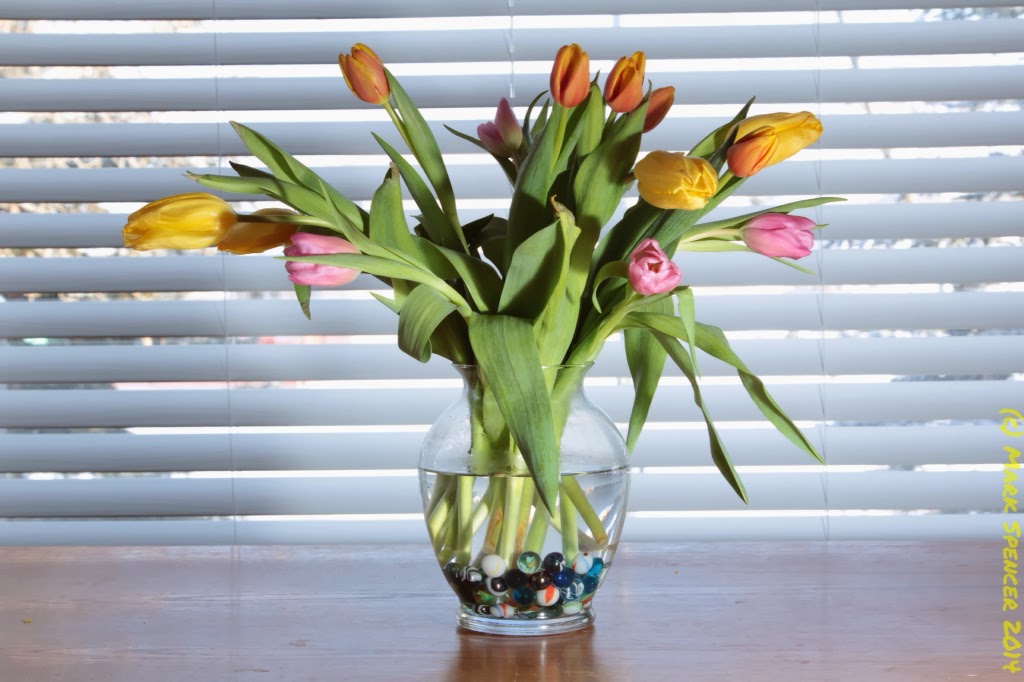
Pat really loves tulips. Since we are able to get cut tulips relatively I expensively, we have agreed that they make a nice addition to our table. And since it's too darn cold outside to shoot, it's time to practice some strobism. You know, using my flash to provide extra lighting ?

The Setup

The table has excellent lighting, owing to the bay windows. It's a bright sunny day out, and we often have to close the blinds partway to keep from getting overwhelmed by the sunlight ! I know, nice problem to have... So this shoot has the vase about two feet in front of the partially-closed blinds. From there, I set up my Canon 60D on a Manfrotto tripod, with the trusty 25-105mm f/4 L lens. I also used the Cacyus v5 transmitters to take the Canon 430EX flash off the body. I wanted to experiment with different lighting strengths & positions.

The Photos

I took about 25 photos. They have the flash in various positions, and in varying strengths. Like the camera, I operate my flash in fully manual mode as well.

This first image was the test-shot. I set my aperture, ISO & shutter speed to create a "perfect exposure. As you can see, the lighting from the window is beautifully exposed, but the flowers & vase are dark. We need a "fill" light.


The second image has too much flash ! Set at 1/8 power, the flash is overwhelming the shot, creating harsh shadows in the leaves.


In the third shot, I have dialled back the flash to 1/16th, which is better, but still a little strong for my tastes.


This fourth shot has the powers knocked back to 1/32 strength, but I also moved the placement of the flash. The colours are still nice & bright, without overwhelming the scene.


In this final shot, I moved the flash further away, dialled it back up to 1/16 power, and have it at almost 90 degrees (on the left side) of the flowers. I think the lighting is OK, but not nearly as dramatic as the fourth shot.


Lessons Learned

I have a lot to learn about studio shooting. And this was shot with only two light sources - the ambient light from the windows and a fill flash. In the future, I'd like to pick up another flash to do multi-plane lighting. I also kept the setup really simple - no reflectors or other mods. About the only mod used was a diffuser on my flash to soften the fill lighting, which I included after the second shot.